
The behavioral health EHR that keeps you audit-ready
Progress notes, treatment plans, scheduling, billing readiness, payroll and compliance reporting in one record — for a solo clinician or a forty-clinician program. Your team keeps working the way it already does.
No credit card Set up in minutes Cancel anytime
Solo from $48.99/mo Clinics from $99/mo + $29 per clinician See all plans
Documentation built to Joint Commission and CARF standards, with HIPAA-aligned safeguards.
- PRP
- OMHC
- SUD
- IOP
- Solo
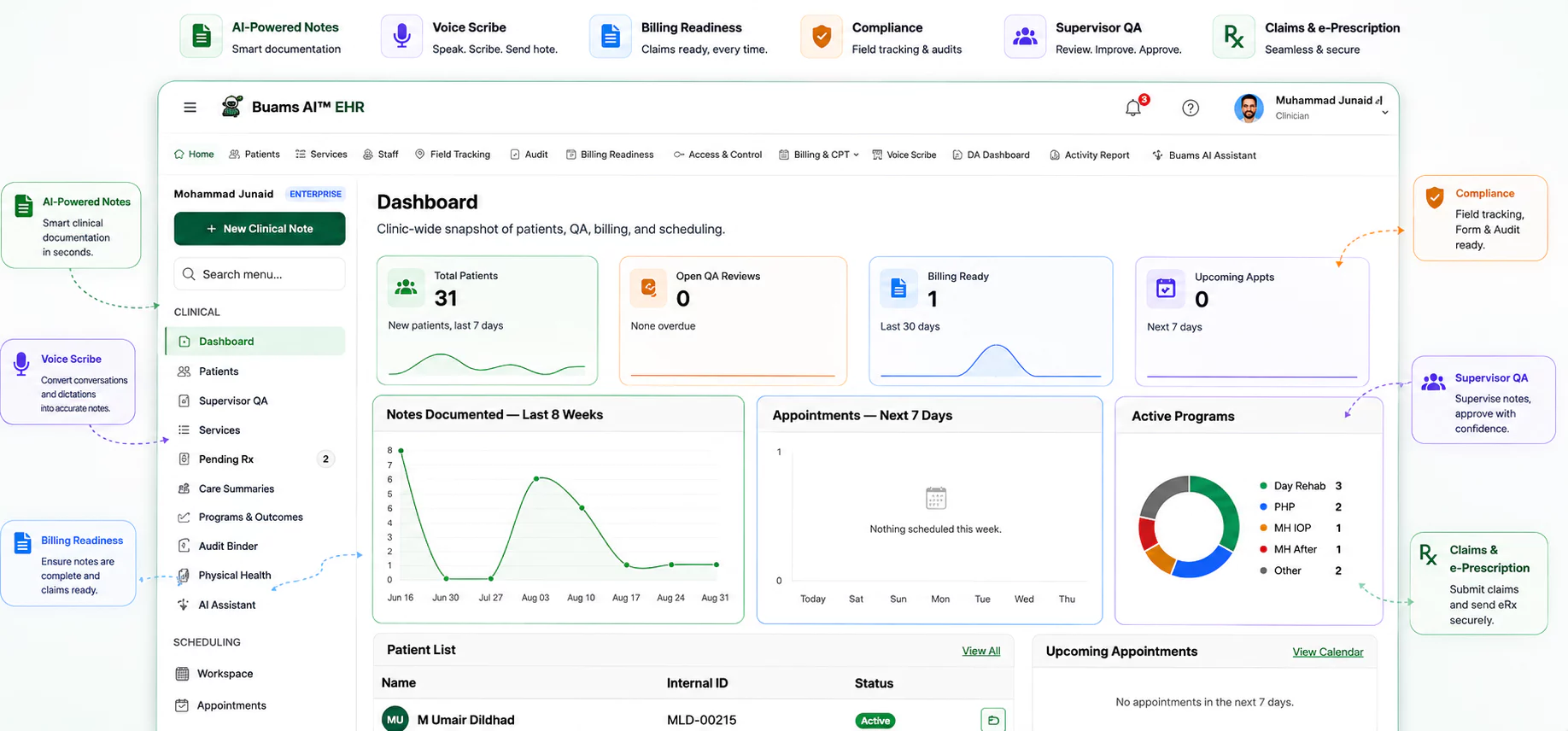
- 8 documentation modules, built for behavioral health
- 100+ published clinical and compliance articles
- Documentation built to Joint Commission and CARF standards
- HIPAA-aligned safeguards, and a BAA on request
Behavioral health programs don't fail on care. They fail on paperwork.
Most programs run on a patchwork of an EHR that was built for primary care, a spreadsheet, and a shared drive. The cost lands in three places, and in every one of them it is discovered too late to be cheap.
Documentation eats the evening
Clinicians finish sessions and then start their real second shift: notes, plans and assessments after hours, from memory that has gone soft. It is the single largest driver of burnout in community behavioral health, and the version that gets billed is always the weaker one.
Paid for twice: in overtime, and again in turnover
Claims go out unready
A missing co-signature, an authorization that expired mid-month, a service code with nothing in the chart behind it. Each one turns a session you delivered and paid staff for into a denial, and you find out weeks later when the fix means reopening a closed note.
Revenue you earned and cannot collect
Audits become fire drills
When a reviewer asks for a chart, the answer should take minutes. Instead it takes a team, a week, and a scramble across three systems that were never meant to talk to each other, while everyone doing the scrambling stops seeing clients.
A week of clinical capacity, per review
Five screens, from the first intake to audit day
No form and no call. Click through the path a client actually takes through your program, and see what the clinician sees at each step.
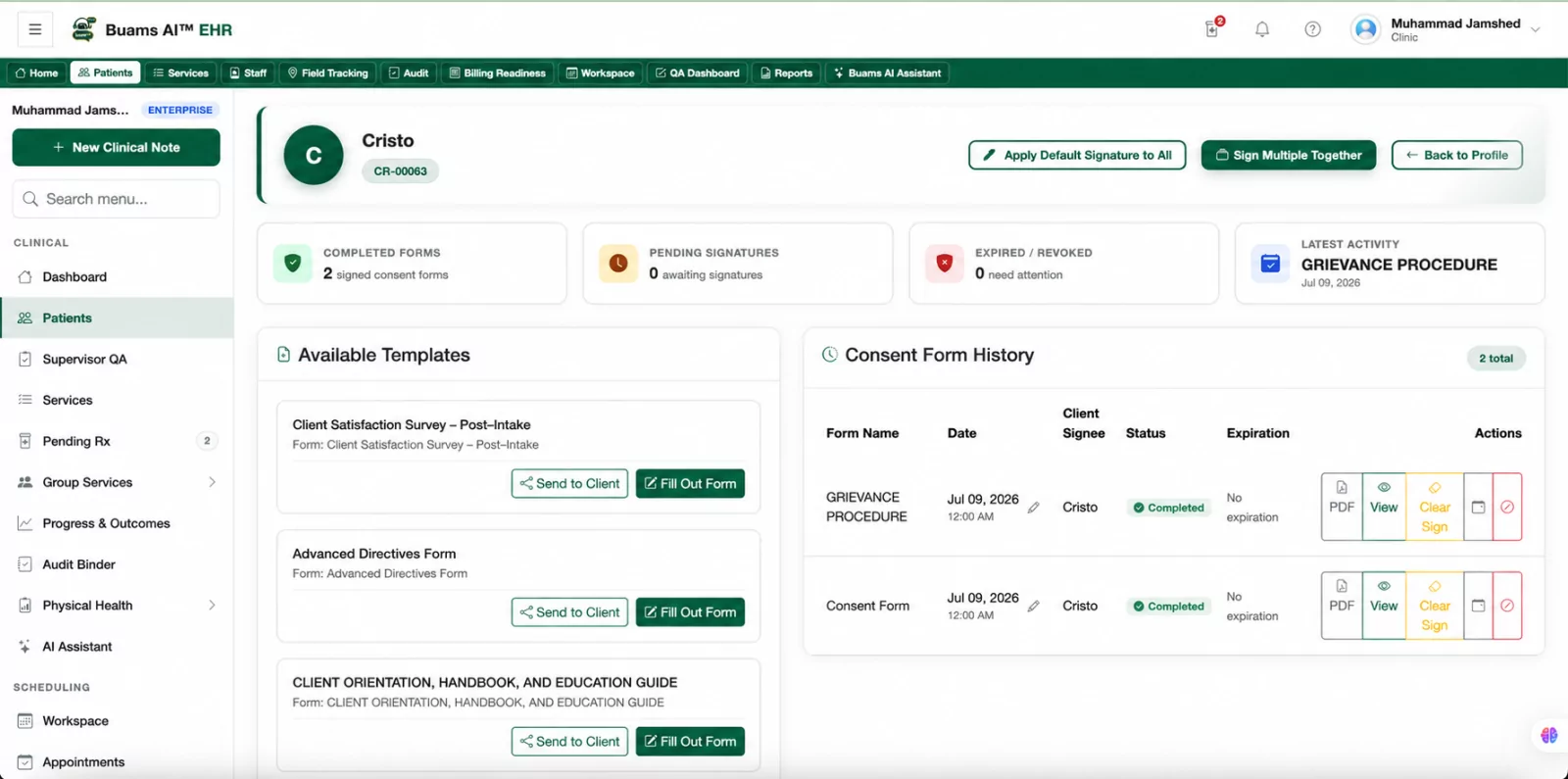
The client arrives once, and the chart knows it
Demographics, program assignment and the authorization go in together, so the units you are allowed to bill are on the chart before anyone documents against them.
- Program, payer and authorization captured at intake
- Units remaining visible on the chart, not in a spreadsheet
- Consent forms sent and countersigned before the first session
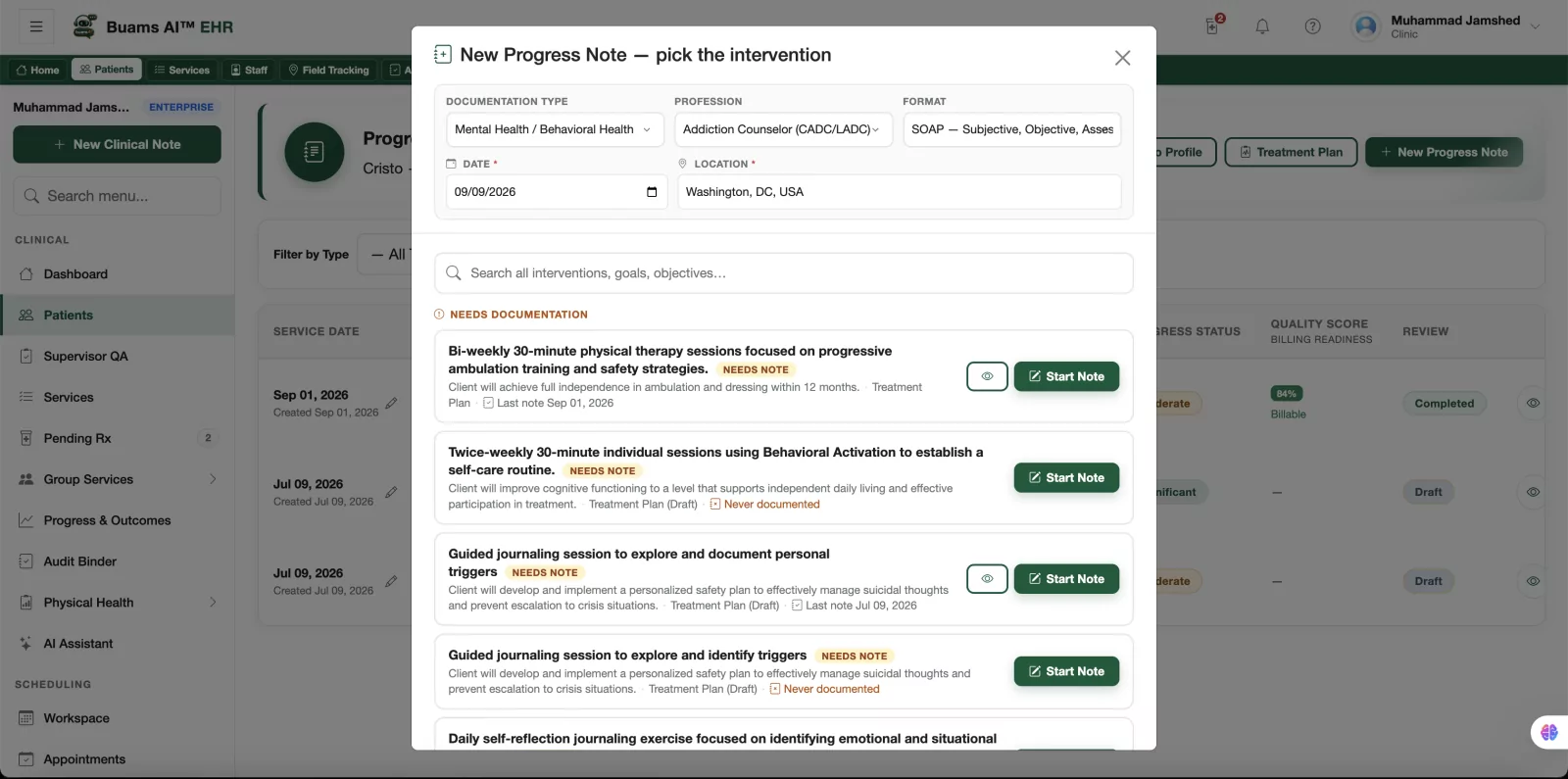
Write in your format, not somebody else's
Your note template, your intervention language, your co-signature rules. Drafting help fills the mechanical parts and marks itself as a draft until a clinician signs.
- Your own note formats, per program and per service
- AI-assisted sections labelled as drafts until signed
- Missing elements flagged while the note is still open
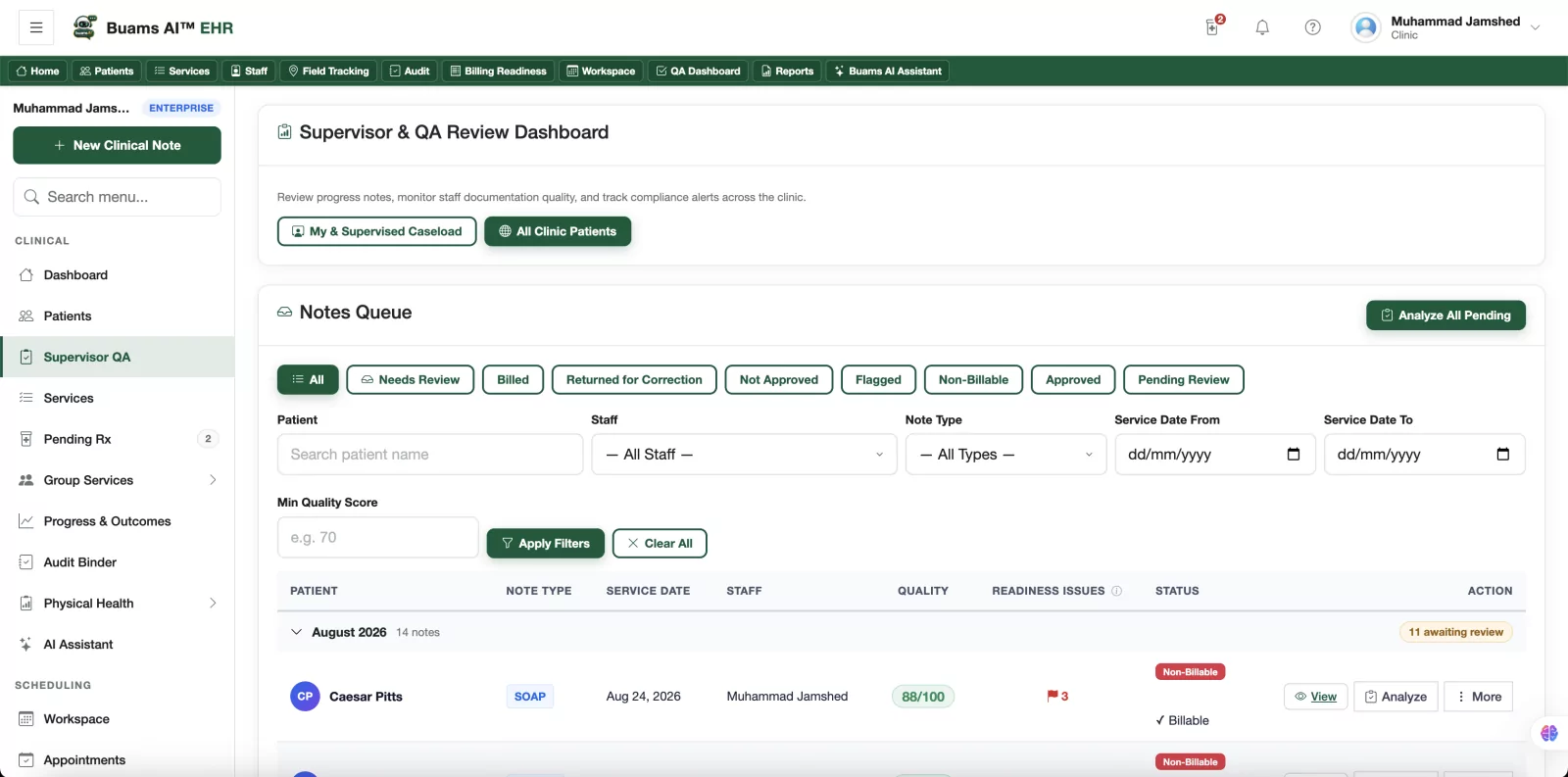
One queue, and a record that you reviewed it
Supervisors see everything awaiting review in one place, return work with a reason attached, and build the oversight trail a reviewer asks for without keeping a separate log.
- Everything awaiting review in a single queue
- Return a note with the reason attached to the record
- Supervision and co-signature evidence captured as you go
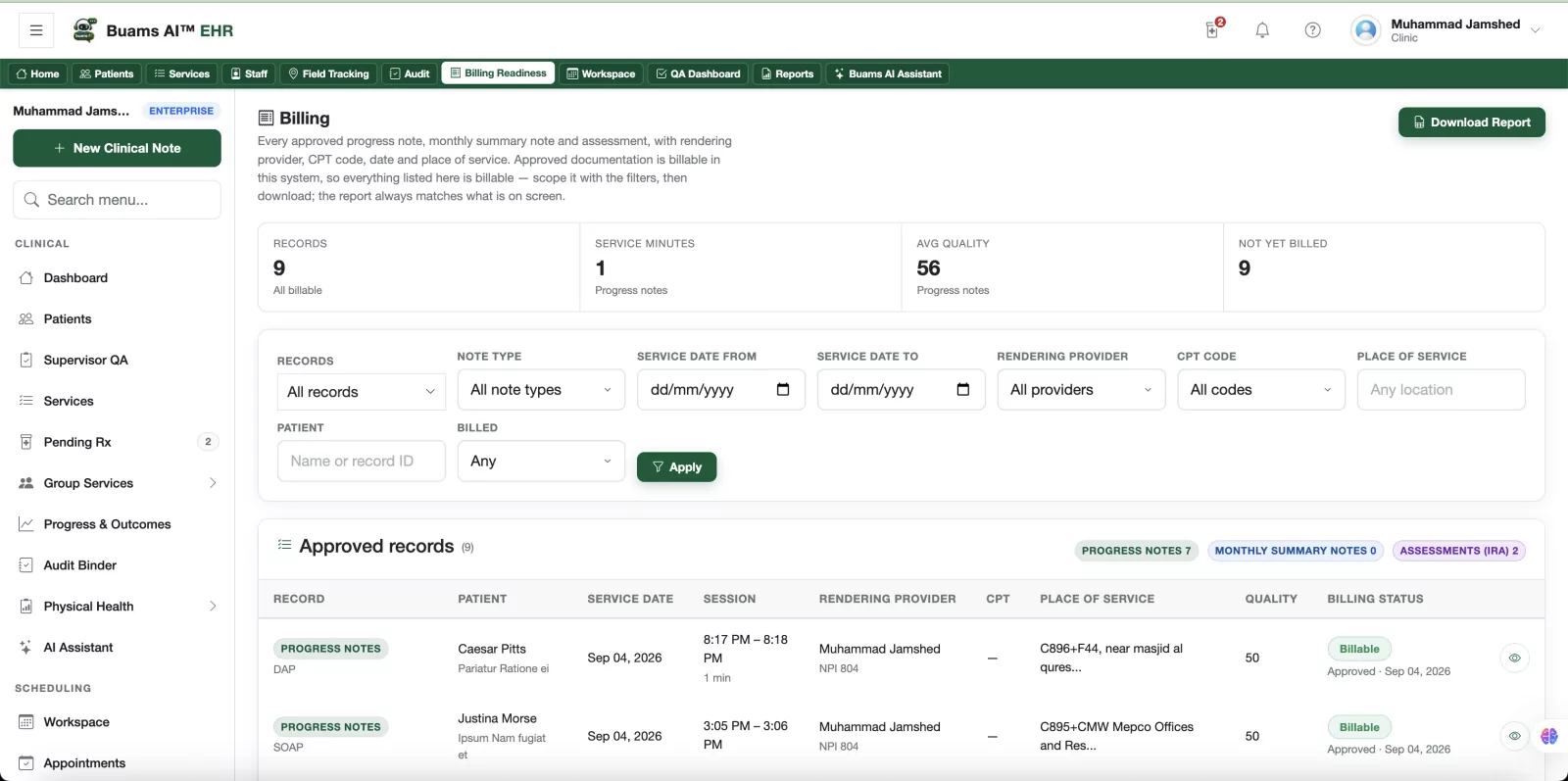
Catch it while it is still cheap to fix
Every delivered service is checked against what the payer will require before the claim goes anywhere: the missing signature, the expired authorization, the service code with nothing behind it.
- Signature, authorization and service code checked together
- Problems surfaced in days, not in a denial weeks later
- Nothing leaves as a claim until the chart supports it
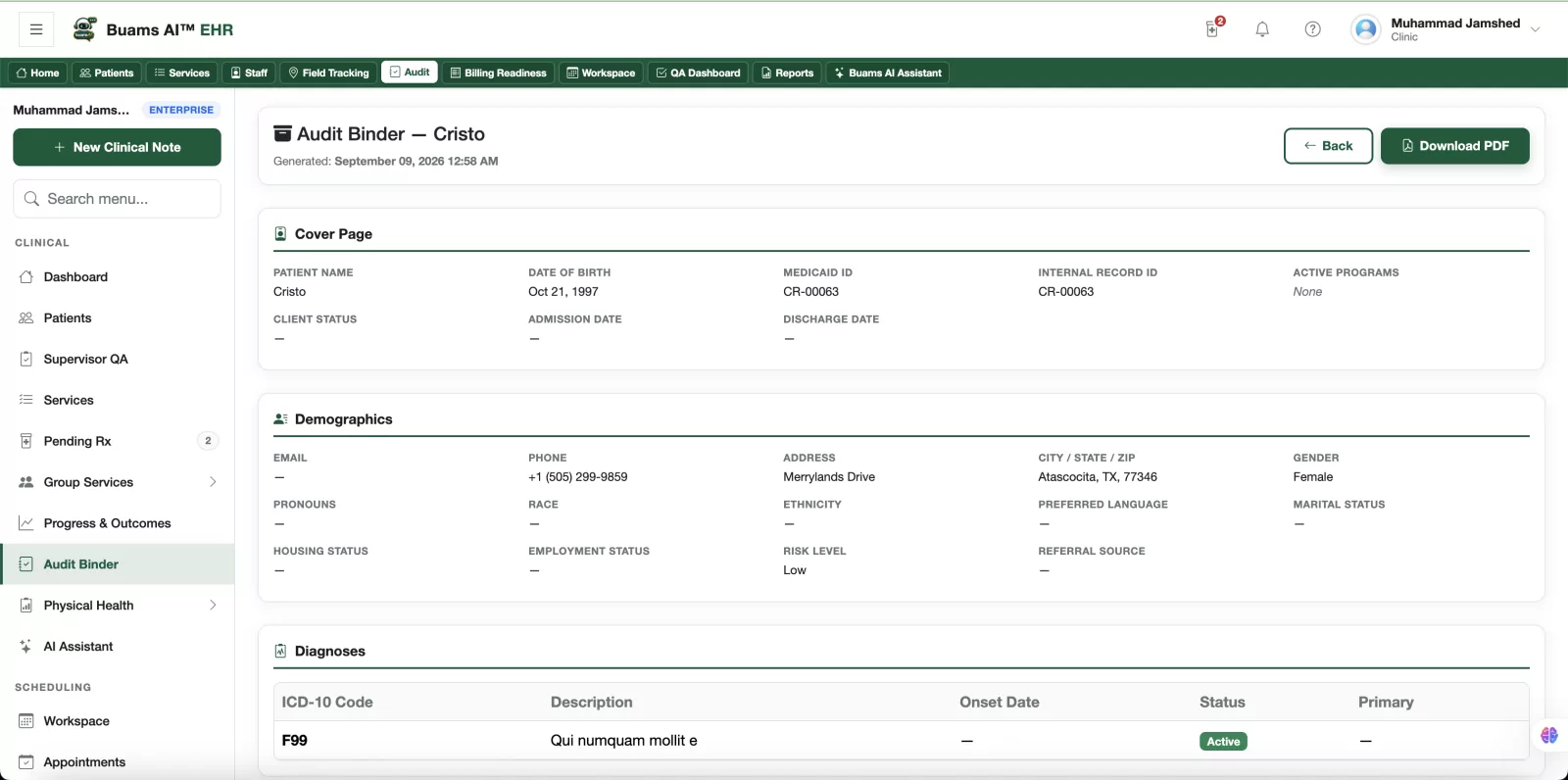
When a reviewer asks for a chart, it takes minutes
Pick the client and the date range and the binder assembles itself from the record, with the audit trail of who viewed and edited what already inside it.
- Chart exports assembled on demand from the live record
- Every view, edit and signature timestamped and exportable
- A task before a review, instead of a week-long project
Nothing gets typed twice
Each stage writes to the same chart, so the next one starts from what the last one recorded. That is the difference between an integrated record and a folder of separate modules that happen to share a login.
- Intake Demographics, program, payer and authorization The assessment opens with the client already known
- Assessment Presenting problems, history, diagnosis, scores The treatment plan starts from what was assessed
- Treatment plan Goals, objectives and planned interventions The note offers the interventions already on the plan
- Progress note The session, the intervention used, the response QA review sees the note against the plan it serves
- Claim Service, units, signature and readiness status The audit binder already holds the evidence chain
One record, from intake to reimbursement
Every feature is AI-assisted and every one writes to the same chart, so nothing has to be re-entered and nothing drifts out of sync. A clinician still reviews and signs everything that carries their name.
Voice Scribe
Dictate straight after a session, in your own words and at your own pace, and get a structured draft in your note format — section...
Learn moreConsent Forms
Build your own consent forms, send them to the client before intake, and keep every signature attached to the chart it belongs to.
Learn moreScreeners
Send the instruments your program relies on, let them score themselves, and watch the result move over time instead of sitting in...
Learn moreAssessments
Run intake and comprehensive assessments in your own format, and let what you record flow into the treatment plan instead of being...
Learn moreTreatment Plans
Write goals, objectives and interventions that link to what was assessed, get them signed by everyone who has to sign, and review...
Learn moreProgress Notes
Write in your own note format, get drafting help where the work is mechanical, and sign knowing the note carries what a reviewer w...
Learn moreSupervisor QA
Give supervisors one queue for everything awaiting review, a consistent way to return work, and a record of oversight that stands...
Learn moreBilling Readiness
Check every delivered service against what the payer will require while it is still cheap to fix, instead of finding out weeks lat...
Learn moreAlso included: scheduling and group sessions, built-in telehealth, payroll by note or unit, credential tracking, role-based access, the audit binder, and program-level outcome reporting. Ask about any of it →
Drafting help that leaves the clinician in control
Buams AI helps with the parts of documentation that are mechanical, and stops well short of the parts that are clinical judgement. Here is the whole of what it does, in one example.
What the clinician says, walking back from the session
“Okay, Tuesday group, eleven to twelve, seven attended. Worked on the distress tolerance stuff again, the TIPP skills. He was actually engaged this time, volunteered about the argument with his brother, used the paced breathing thing when he got activated talking about it, which is new. Still not doing the homework. Next week keep going with the same module, and I want to check in about the housing appointment.”
The draft it returns, in your note format Unsigned draft
- Service
- PRP group, 60 minutes, 4 units. 7 participants.
- Intervention
- Distress tolerance module, TIPP skills, continued from prior session.
- Response
- Client engaged actively, disclosed recent conflict with sibling, and applied paced breathing in session when affect escalated. First observed independent use of the skill.
- Barrier
- Between-session practice assignments remain incomplete.
- Plan
- Continue distress tolerance module next session. Follow up on scheduled housing appointment.
Flagged before signature: link the response to a goal on the active treatment plan.
Illustrative example. Not a recording of a real session.
- Voice scribe Dictate after a session and get a structured draft in your note format.
- Draft assistance Turn session details into a first pass at interventions and progress language.
- Documentation review Flag notes that are missing the elements a reviewer will look for.
Nothing is filed on its own. Every AI-assisted note is a draft until a clinician reviews, edits and signs it. The signature, and the clinical judgement behind it, stays with the person accountable for the record.
Built around how behavioral health actually bills
Unit-based services, group notes, supervision hours and authorization tracking are first-class here, not workarounds bolted onto a system designed for fifteen-minute medical visits.
| Capability | EHR built for primary care | Legacy behavioral health EHR | Buams AI |
|---|---|---|---|
| Unit-based service billing Bill in 15-minute units against an authorization, not per visit | Not supported | Built for this | Built for this |
| Authorization tracking on the chart Units approved, used and remaining, visible while documenting | Partly, or as a workaround Usually a spreadsheet alongside | Built for this | Built for this |
| Group session notes One group, individualised notes per participant | Not supported | Built for this | Built for this |
| PRP and OMHC note formats Program-specific templates your reviewers already accept | Not supported | Partly, or as a workaround Often a paid customisation | Built for this |
| Supervision hours and co-signature Track supervision as a record, not a side log | Not supported | Partly, or as a workaround Co-signature yes, hours usually not | Built for this |
| Readiness checked before the claim Missing signature or expired authorization caught pre-submission | Partly, or as a workaround Scrubbing at the clearinghouse, after the fact | Partly, or as a workaround Varies by module and configuration | Built for this |
| Audit binder assembled on demand Full chart export for a date range, with the access trail inside | Partly, or as a workaround Chart print, assembled manually | Partly, or as a workaround Often an export request or a report build | Built for this |
| Payroll driven by documentation Pay by note or by unit from the record that was signed | Not supported | Not supported | Built for this |
| AI drafting with the clinician signing Dictate or draft, then review and sign. Nothing files itself | Partly, or as a workaround Increasingly, as a paid add-on | Partly, or as a workaround Emerging, often a separate product | Built for this |
| Admin, billing and QA seats included Pay for clinicians, not for the people supporting them | Not supported | Not supported | Built for this |
Built for this Partly, or as a workaround Not what the system is for
Categories, not products. Behavioral health platforms differ from each other and change over time, so check these against the system you actually run rather than against a vendor name we picked.
Live in 14 days, without a gap in your documentation
The real question is not whether this is better. It is what moving costs you, and what happens if it goes wrong halfway through. So here is the plan, and here is what you are not committing to.
-
Day 1
Your data comes across
Send us your client list and we import it, with clinical documents attached to the charts they belong to. Nothing is retyped.
-
Days 2 to 4
Your templates get built
Your note formats, assessments and consent forms are configured to match what your program already uses and what your payers already accept.
-
Days 5 to 7
Your team gets trained
Role by role, in sessions of under an hour. Clinicians learn documentation, supervisors learn the review queue, billing learns readiness checks.
-
Days 8 to 12
You run both systems
Document in parallel for a week so nobody is trusting a new system with a real audit window on day one. You verify before you commit.
-
Day 14
You go live
Old system read only, new system in production, and your first month of documentation is reviewed with you before it is billed.
- Migration assistance is included Importing your clients and configuring your templates is part of onboarding, not a professional services line item.
- Month to month, no lock in There is no multi year contract to sign and no termination penalty. Stay because the documentation is better.
- Your records leave with you Export charts and structured records whenever you want, including on the way out. Your data is not the thing keeping you here.
Price the status quo with your own numbers
Two costs, both of which most programs carry without ever totalling: revenue lost to denials that a readiness check would have caught, and clinical hours spent documenting after them.
Your program
What you'd expect to recover Both start low on purpose
Denied or reworked each year
—
of which — is what a pre-claim readiness check is for
After-hours documentation each year
—
— clinical hours, at the loaded cost you set
Addressable, on your numbers
—
Your inputs, your arithmetic. These are not our claims about your program, and nothing here is a guarantee of a result.
Protected health information, handled like it matters
- Encrypted in transit and at rest Patient data is encrypted end to end, with each clinic isolated on its own address.
- Role-based access control Staff see the records their role requires and nothing beyond it, down to the field.
- Complete audit trail Every view, edit and signature is recorded, timestamped and exportable for review.
- Your data stays yours Export charts and structured records on demand, including standards-based clinical exports.
Documentation built to Joint Commission and CARF standards, with HIPAA-aligned safeguards.
What we'll send your compliance officer
Ask once and you get the whole set, before you commit to anything.
- Business Associate Agreement, ready to countersign
- Security and hosting overview, written for a reviewer
- A sample audit trail export from a synthetic chart
- The role based access matrix, permission by permission
- Data export and retention terms, including on termination
Judge it on your own charts
We would rather you tested this than took our word for it. Bring a few of your own notes across and see how the documentation actually feels, with 30 days of full access and no card, or spend 20 minutes with someone who can answer billing and compliance questions directly.
Read how each module works
Every feature has a page describing what it does, how it works step by step, and what it does not do. Written for a program director, not for a search engine.
Start with Voice ScribeJudge how well we know the work
100+ published articles on behavioral health documentation, HIPAA, revenue cycle and audit preparation. Read a few and decide whether we understand your problem.
Browse the libraryHave your compliance officer check us
The BAA, the security overview, the access-control matrix and a sample audit-trail export, sent on request before you commit to anything.
See what we sendStart solo, or price a whole program
Solo clinicians pay one flat price. Clinics pay a platform base plus a seat for each clinician. Every plan includes a 30-day free trial and no card is required to start.
Solo Starter
$48.99 / month
Flat rate — one clinician · 30-day trial
Perfect to get started
Start 30-day trialSolo Professional
$68.99 / month
Flat rate — one clinician · 30-day trial
More power, more efficiency
Start 30-day trialSolo Prescriber
$98.99 / month
Flat rate — one clinician · 30-day trial
Built for prescribers
Start 30-day trialYou pay for clinicians, not for everyone. Administrators, front desk, billers and QA reviewers get their own logins, their own permissions and their own audit trail at no charge. Most per-user pricing would bill you for every one of them.
Running a program or a group practice?
Clinic plans start at $99/month plus $29 per clinician, with a 3-clinician minimum. Month to month, and migration assistance is included.
Before you decide
Give your clinicians their evenings back
30 days of full access, no credit card, and your records stay yours. Bring a few charts across and see how the documentation actually feels.
Not ready for either? Price your current setup, or click through the product with no form at all.